设置
了解如何为 Rebar 方块配置和使用的设置系统
最后更新时间
设置
与物品一样,您可以为方块分配设置。
假设我们有一个每次右键点击计数器就加 1 的方块:
public class ExampleAddonKeys {
    public static final NamespacedKey EXAMPLE_BLOCK = new NamespacedKey(ExampleAddon.getInstance(), "example_block");
}public class ExampleBlock extends RebarBlock implements RebarInteractBlock {
public static final NamespacedKey COUNTER_KEY = new NamespacedKey(ExampleAddon.getInstance(), "counter");
private int counter = 0;
public ExampleBlock(@NotNull Block block, @NotNull BlockCreateContext context) {
super(block, context);
}
public ExampleBlock(@NotNull Block block, @NotNull PersistentDataContainer pdc) {
super(block, pdc);
counter = pdc.get(COUNTER_KEY, RebarSerializers.INTEGER);
}
@Override
public void write(@NonNull PersistentDataContainer pdc) {
pdc.set(COUNTER_KEY, RebarSerializers.INTEGER, counter);
}
@Override
public void onInteract(@NotNull PlayerInteractEvent event, @NotNull EventPriority priority) {
if (event.getAction().isRightClick() && event.getHand() == EquipmentSlot.HAND) {
counter++;
event.getPlayer().sendMessage(String.valueOf(counter));
}
}
}public final class ExampleAddonBlocks {
public static void initialize() {
RebarBlock.register(ExampleAddonKeys.EXAMPLE_BLOCK, Material.IRON_BLOCK, ExampleBlock.class);
}
}public final class ExampleAddonItems {
public static final ItemStack EXAMPLE_BLOCK = ItemStackBuilder.rebar(Material.IRON_BLOCK, ExampleAddonKeys.EXAMPLE_BLOCK)
.build();
public static void initialize() {
RebarItem.register(RebarItem.class, EXAMPLE_BLOCK, ExampleAddonKeys.EXAMPLE_BLOCK);
PylonPages.MISCELLANEOUS.addItem(EXAMPLE_BLOCK);
}
}item:
example_block:
name: "Example Block"
lore: |-
<arrow> An example block假设你想让每次点击增加的数值变成可配置的,而不是固定加 1。先创建文件 resources/settings/example_block.yml(文件名必须和方块的 key 对应):
increment-by: 4用 getSettings() 就能拿到配置值:
public class ExampleBlock extends RebarBlock implements RebarInteractBlock {


    // ...

    public final int incrementBy = getSettings().getOrThrow("increment-by", ConfigAdapter.INTEGER);

    // ...
}
现在把计数器的增量改成从配置读取:
public class ExampleBlock extends RebarBlock implements RebarInteractBlock {


    // ...

    @Override
    public void onInteract(@NotNull PlayerInteractEvent event, @NotNull EventPriority priority) {
        if (event.getAction().isRightClick() && event.getHand() == EquipmentSlot.HAND) {
            counter += incrementBy;
            event.getPlayer().sendMessage(String.valueOf(counter));
        }
    }
}
这样方块每次就会按配置的增量(这里是 4)来计数了。
一个类,多个方块
假设你想要两种不同的计数器:一种每次加 2,另一种每次加 4。不用为此新建类,直接用同一个类注册两个方块就行:
public class ExampleAddonKeys {
    public static final NamespacedKey EXAMPLE_BLOCK_1 = new NamespacedKey(ExampleAddon.getInstance(), "example_block_1");
    public static final NamespacedKey EXAMPLE_BLOCK_2 = new NamespacedKey(ExampleAddon.getInstance(), "example_block_2");
}public final class ExampleAddonBlocks {
public static void initialize() {
RebarBlock.register(ExampleAddonKeys.EXAMPLE_BLOCK_1, Material.IRON_BLOCK, ExampleBlock.class);
RebarBlock.register(ExampleAddonKeys.EXAMPLE_BLOCK_2, Material.IRON_BLOCK, ExampleBlock.class);
}
}public final class ExampleAddonItems {
public static final ItemStack EXAMPLE_BLOCK_1 = ItemStackBuilder.rebar(Material.IRON_BLOCK, ExampleAddonKeys.EXAMPLE_BLOCK_1)
.build();
public static final ItemStack EXAMPLE_BLOCK_2 = ItemStackBuilder.rebar(Material.IRON_BLOCK, ExampleAddonKeys.EXAMPLE_BLOCK_2)
.build();
public static void initialize() {
RebarItem.register(RebarItem.class, EXAMPLE_BLOCK_1, ExampleAddonKeys.EXAMPLE_BLOCK_1);
PylonPages.MISCELLANEOUS.addItem(EXAMPLE_BLOCK_1);
RebarItem.register(RebarItem.class, EXAMPLE_BLOCK_2, ExampleAddonKeys.EXAMPLE_BLOCK_2);
PylonPages.MISCELLANEOUS.addItem(EXAMPLE_BLOCK_2);
}
}item:
example_block_1:
name: "Example Block I"
lore: |-
<arrow> An example block
example_block_2:
name: "Example Block II"
lore: |-
<arrow> An example block每个方块都可以有自己独立的配置:
increment-by: 2increment-by: 4这样你就有了两个方块:一个每次加 2,另一个每次加 4。
方块和物品共享设置
设置是通过 NamespacedKey 来关联的。底层实现上,getSettings() 就是 Settings.get(getKey()) 的简写。因为这里物品和方块共用同一个 key,所以在物品类里调用 getSettings() 拿到的是同一份配置。
举个例子,假设你想在 Example Block 物品的 lore 里显示每次增加的数值。最直接的做法是把这个值硬写到语言文件里:
item:
  example_block_1:
    name: "Example Block I"
    lore: |-
      <arrow> <attr>Increments by:</attr> 2

  example_block_2:
    name: "Example Block II"
    lore: |-
      <arrow> <attr>Increments by:</attr> 4
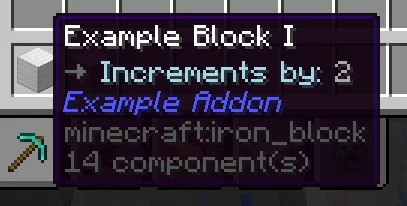
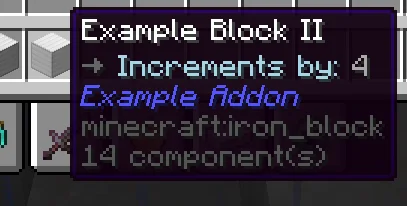
但这样做有个问题:配置值改了之后,物品 lore 里的文字不会跟着变。所以我们应该用占位符:
item:
  example_block_1:
    name: "Example Block I"
    lore: |-
      <arrow> <attr>Increments by:</attr> %increment-by%

  example_block_2:
    name: "Example Block II"
    lore: |-
      <arrow> <attr>Increments by:</attr> %increment-by%
要支持占位符,需要新建一个类继承 RebarItem 并覆写 getPlaceholders() 方法,把可配置的 incrementBy 值以 %increment-by% 的形式暴露出去:
public class ExampleBlockItem extends RebarItem {

    public final int incrementBy = getSettings().getOrThrow("increment-by", ConfigAdapter.INTEGER);

    public ExampleBlockItem(@NonNull ItemStack stack) {
        super(stack);
    }

    @Override
    public @NonNull List<RebarArgument> getPlaceholders() {
        return List.of(
            RebarArgument.of("increment-by", incrementBy)
        );
    }
}
我真的需要在物品和方块里各取一次 incrementBy 吗?
没办法,确实得这样。之前也讨论过别的方案,但相比之下这是最可行的折衷。其他方案要么代码更复杂,要么灵活性更差。
接下来用这个类来注册物品:
public final class ExampleAddonItems {

    public static final ItemStack EXAMPLE_BLOCK_1 = ItemStackBuilder.rebar(Material.IRON_BLOCK, ExampleAddonKeys.EXAMPLE_BLOCK_1)
            .build();

    public static final ItemStack EXAMPLE_BLOCK_2 = ItemStackBuilder.rebar(Material.IRON_BLOCK, ExampleAddonKeys.EXAMPLE_BLOCK_2)
            .build();

    public static void initialize() {
        RebarItem.register(ExampleBlockItem.class, EXAMPLE_BLOCK_1, ExampleAddonKeys.EXAMPLE_BLOCK_1);
        PylonPages.MISCELLANEOUS.addItem(EXAMPLE_BLOCK_1);

        RebarItem.register(ExampleBlockItem.class, EXAMPLE_BLOCK_2, ExampleAddonKeys.EXAMPLE_BLOCK_2);
        PylonPages.MISCELLANEOUS.addItem(EXAMPLE_BLOCK_2);
    }
}
这样,物品 lore 里就会显示每次递增的数值了: